Webflow Localization: The Best Methods According to Experts in 2026

Written by
William Lee
October 14, 2026
7 min read
Building a multilingual Webflow site? Experts share the best localization methods — from Webflow's native Localization feature to third-party tools like Weglot and Transifex. Find out which approach is right for your project.

Introduction

Localization is no longer optional for businesses targeting global audiences. Serving content in a user's native language dramatically improves engagement, conversion rates, and trust.

Webflow has invested heavily in localization capabilities — but the right approach depends on your project's complexity and budget. This guide breaks down your options based on what actually works in practice.

Webflow localization methods comparison

Why Localization Matters for Your Webflow Site

The Business Case for Multilingual Websites

Research consistently shows that users are more likely to purchase when websites speak their native language — even when they're competent in English. For SaaS, e-commerce, and service businesses targeting non-English markets, localization often delivers some of the highest ROI of any marketing investment.

What Good Localization Involves

True localization goes beyond translation. It includes adapting images, date formats, currencies, units of measurement, and cultural references to feel native to each market. The best localized sites don't feel like translations — they feel built for that audience.

Option 1: Webflow Native Localization

What It Is

Webflow launched its native Localization feature in 2023. It allows you to create alternate locales directly within the Webflow Designer, translate both static and CMS content, and serve different language versions from the same project with proper hreflang support.

Pros and Cons

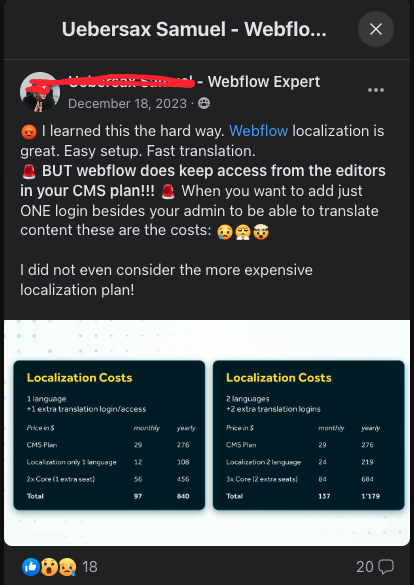
It's a powerful option for teams already in the Webflow ecosystem. The main limitation is cost — native localization requires a higher-tier Webflow plan and is priced per locale. For teams managing 5+ locales, costs can add up quickly.

Best for: Teams fully committed to the Webflow ecosystem with budget for per-locale pricing. Ideal when you want full control inside the same Webflow project without third-party dependencies.
Webflow native localization interface

Option 2: Weglot

What It Is

Weglot is the most popular third-party localization tool for Webflow. It auto-translates your site using machine translation and allows human editors to refine translations in a dedicated dashboard. Setup involves adding a Weglot script to Webflow's custom code.

Pros and Cons

Weglot is fast to implement and handles both static and CMS content well. Pricing is subscription-based per language — generally more affordable than Webflow's per-locale pricing for multi-language sites. The main downside is the dependency on a third-party script.

Best for: Fast implementation with good machine translation and easy human editing. Ideal for teams who want localization without deep technical setup or design workflow changes.

Weglot dashboard for Webflow translation management

Option 3: Localize.js

What It Is

Localize.js is a developer-friendly localization tool that integrates via JavaScript. It gives teams more control over translation management and workflow compared to fully automated solutions, making it preferred by teams with in-house translation capacity and editorial process requirements.

Pros and Cons

More flexibility and control than Weglot, but requires more technical setup. Better suited to organizations with dedicated localization workflows, translation memory requirements, or enterprise translation management systems.

Best for: Developer-led teams who want granular workflow control and prefer to manage translations through their own editorial and QA process.

Localize.js developer integration for Webflow

Option 4: Manual Multi-Language Setup

What It Is

Some teams build separate Webflow pages or separate Webflow projects for each language. This gives maximum design control per locale and zero dependency on third-party tools, but significantly increases maintenance overhead.

When It Makes Sense

This approach is best for projects with very specific design requirements per locale — for example, an entirely different layout for Japanese vs. English audiences. It works well with small language sets (2–3 locales) and teams with the bandwidth to maintain separate content structures.

Best for: Highly customized locale-specific designs with a small number of languages and a team willing to maintain parallel content structures long-term.

How to Choose the Right Localization Method

Decision Framework

Your choice should depend on three factors: budget, team capacity, and design control requirements.

  • Webflow Native Localization — Best if you want everything inside Webflow with no third-party tools and have budget for per-locale pricing
  • Weglot — Best for fast implementation, multi-language sites on a budget, and machine translation with human review
  • Localize.js — Best for developer-led teams with enterprise translation workflow requirements
  • Manual setup — Best for highly customized locale-specific designs with a small number of languages

For international businesses also considering how to reach Chinese users, see our guide on whether Webflow websites work in China. For broader SEO implications of multilingual sites, see our Webflow SEO guide.

Webflow localization comparison overview

Conclusion

Localizing your Webflow site is one of the most impactful ways to expand your global reach. Whether you use Webflow's native localization or a third-party tool like Weglot, the right choice depends on your team's capacity, budget, and localization scope.

Start with the solution that fits your current scale — you can always upgrade as your needs grow. Our Webflow development team can help you architect the right localization solution for your specific requirements. Talk to us →

Webflow Localization: The Best Methods According to Experts in 2026

Written by
William Lee
October 14, 2026
7 min read
Building a multilingual Webflow site? Experts share the best localization methods — from Webflow's native Localization feature to third-party tools like Weglot and Transifex. Find out which approach is right for your project.

Introduction

Localization is no longer optional for businesses targeting global audiences. Serving content in a user's native language dramatically improves engagement, conversion rates, and trust.

Webflow has invested heavily in localization capabilities — but the right approach depends on your project's complexity and budget. This guide breaks down your options based on what actually works in practice.

Webflow localization methods comparison

Why Localization Matters for Your Webflow Site

The Business Case for Multilingual Websites

Research consistently shows that users are more likely to purchase when websites speak their native language — even when they're competent in English. For SaaS, e-commerce, and service businesses targeting non-English markets, localization often delivers some of the highest ROI of any marketing investment.

What Good Localization Involves

True localization goes beyond translation. It includes adapting images, date formats, currencies, units of measurement, and cultural references to feel native to each market. The best localized sites don't feel like translations — they feel built for that audience.

Option 1: Webflow Native Localization

What It Is

Webflow launched its native Localization feature in 2023. It allows you to create alternate locales directly within the Webflow Designer, translate both static and CMS content, and serve different language versions from the same project with proper hreflang support.

Pros and Cons

It's a powerful option for teams already in the Webflow ecosystem. The main limitation is cost — native localization requires a higher-tier Webflow plan and is priced per locale. For teams managing 5+ locales, costs can add up quickly.

Best for: Teams fully committed to the Webflow ecosystem with budget for per-locale pricing. Ideal when you want full control inside the same Webflow project without third-party dependencies.

Webflow native localization interface

Option 2: Weglot

What It Is

Weglot is the most popular third-party localization tool for Webflow. It auto-translates your site using machine translation and allows human editors to refine translations in a dedicated dashboard. Setup involves adding a Weglot script to Webflow's custom code.

Pros and Cons

Weglot is fast to implement and handles both static and CMS content well. Pricing is subscription-based per language — generally more affordable than Webflow's per-locale pricing for multi-language sites. The main downside is the dependency on a third-party script.

Best for: Fast implementation with good machine translation and easy human editing. Ideal for teams who want localization without deep technical setup or design workflow changes.

Weglot dashboard for Webflow translation management

Option 3: Localize.js

What It Is

Localize.js is a developer-friendly localization tool that integrates via JavaScript. It gives teams more control over translation management and workflow compared to fully automated solutions, making it preferred by teams with in-house translation capacity and editorial process requirements.

Pros and Cons

More flexibility and control than Weglot, but requires more technical setup. Better suited to organizations with dedicated localization workflows, translation memory requirements, or enterprise translation management systems.

Best for: Developer-led teams who want granular workflow control and prefer to manage translations through their own editorial and QA process.

Localize.js developer integration for Webflow

Option 4: Manual Multi-Language Setup

What It Is

Some teams build separate Webflow pages or separate Webflow projects for each language. This gives maximum design control per locale and zero dependency on third-party tools, but significantly increases maintenance overhead.

When It Makes Sense

This approach is best for projects with very specific design requirements per locale — for example, an entirely different layout for Japanese vs. English audiences. It works well with small language sets (2–3 locales) and teams with the bandwidth to maintain separate content structures.

Best for: Highly customized locale-specific designs with a small number of languages and a team willing to maintain parallel content structures long-term.

How to Choose the Right Localization Method

Decision Framework

Your choice should depend on three factors: budget, team capacity, and design control requirements.

  • Webflow Native Localization — Best if you want everything inside Webflow with no third-party tools and have budget for per-locale pricing
  • Weglot — Best for fast implementation, multi-language sites on a budget, and machine translation with human review
  • Localize.js — Best for developer-led teams with enterprise translation workflow requirements
  • Manual setup — Best for highly customized locale-specific designs with a small number of languages

For international businesses also considering how to reach Chinese users, see our guide on whether Webflow websites work in China. For broader SEO implications of multilingual sites, see our Webflow SEO guide.

Webflow localization comparison overview

Conclusion

Localizing your Webflow site is one of the most impactful ways to expand your global reach. Whether you use Webflow's native localization or a third-party tool like Weglot, the right choice depends on your team's capacity, budget, and localization scope.

Start with the solution that fits your current scale — you can always upgrade as your needs grow. Our Webflow development team can help you architect the right localization solution for your specific requirements. Talk to us →

Frequently Asked Questions

Does Webflow support multiple languages natively?

How does Weglot work with Webflow?

How much does Webflow Localization cost?

What is the difference between Webflow Localization and Weglot?

What is the best localization tool for Webflow?

Is Webflow Localization SEO-friendly?

Can I translate Webflow CMS content?

How do I add a language switcher in Webflow?

Ready to build something coherent?

Let's talk. We're dedicated to bringing your vision to life.

sample glossary link
search-intent
Search intent
The reason behind a search - learning, comparing, or buying. "What is AEO" and "AEO agency near me" are different intents and need different content.
featured-snippet-people-also-ask
Featured snippet / People Also Ask
Google's answer boxes that appear above or inside the link list. Like FAQ blocks, they're easy pickings for AI answer engines.
robots-txt
robots.txt
A file that tells crawlers what to read and what to skip. It's how you keep draft or private pages out of search results.
sitemap
Sitemap (sitemap.xml)
A file listing every page on your site, submitted so crawlers can find them all.
core-web-vitals
Core Web Vitals
Google's speed and usability scores for your pages. Slow, awkward pages get buried in both search and AI citations.
ga4
GA4 (Google Analytics 4)
Google's free dashboard showing who visits your site and where they come from - including AI-referred visitors. The default way to measure whether all of this is working.
ai-referred-traffic
AI-referred traffic
Visits to your website that started with an AI answer. You can see this in analytics as a traffic source, alongside Google and social.
sentiment
Sentiment
Whether the AI describes your brand positively, neutrally, or negatively. AI usually reflects what your site and third-party pages say, so sentiment is fixable.
mention-rate
Mention rate
How often your brand is mentioned at all in AI answers, with or without a link. Mentions matter because they shape what customers remember.
citation-rate
Citation rate
The percentage of AI answers about your industry that cite your website as a source. Most companies today are cited in well under 10% of answers - the bar is low and the opportunity is real.
share-of-voice
Share of voice
How often AI answers mention your brand compared to competitors. This replaces "keyword ranking" as the scoreboard in an AI-search world.
faq-content
FAQ content
Question-and-answer blocks on your pages. Both Google and AI tools lift answers straight from these, which makes them one of the easiest AEO wins.
authority-e-e-a-t
Authority / E-E-A-T
How trustworthy search engines and AI judge your site: Experience, Expertise, Authoritativeness, and Trust. Show who writes your content and why they know the topic.
indexing
Indexing
Being stored in a search engine's or AI system's database so you can appear in results. A crawled page that isn't indexed is invisible.
crawling
Crawling
The process of search and AI bots reading your website. If bots can't read your pages, you can't rank or be cited.
llms-txt
llms.txt
A small file on your website that tells AI tools which pages to read. Think of it as a table of contents written for robots.
entity
Entity
The machine-readable version of who your business is: consistent name, logo, contact details, and social profiles across the web. AI tools stitch these together to decide what to say about you.
schema-markup
Structured data / schema markup
Extra code on your pages that spells out what your content is - your business name and address, FAQs, reviews, articles - in a format machines can read. It is the difference between "a webpage" and "a business record."
rag
RAG (Retrieval-Augmented Generation)
How answer engines work: they first pull real content from the web, then generate an answer from it. This is why your website copy feeds AI answers - and why AEO works at all.
hallucination
Hallucination
When AI confidently says something false. For a business, this matters: an AI may describe your services, pricing, or hours incorrectly, and customers will believe it unless your website tells the correct story.
ai-citation
AI citation / AI mention
When an answer engine names your business or links your site as a source. Being cited builds trust; being left out means AI customers never hear about you.
geo
GEO (Generative Engine Optimization)
The same practice as AEO under a different name. Treat them as one thing.
aeo
AEO (Answer Engine Optimization)
Getting your business cited and recommended when customers ask AI tools about your industry. If SEO is ranking in a list, AEO is being the named source in the answer.
ai-overview
AI Overview (AIO)
Google's AI answer box at the top of some search results. It summarizes sources - including possibly your website - before the regular link list.
generative-ai
Generative AI (gen AI)
AI that creates new text, images, or code rather than just finding existing content. ChatGPT is the most famous example.
llm
LLM (Large Language Model)
The AI technology behind answer engines. It predicts text based on patterns learned from huge amounts of writing. When people say "the AI," they usually mean an LLM.
answer-engine
Answer engine
A tool that answers your question directly with a written, cited answer instead of a list of links. The main ones: ChatGPT, Gemini, Perplexity, and Google's AI Overviews.
zero-click-search
Zero-click search
A search that ends without any click because the answer is shown right on the results page - a snippet, a map, or an AI answer. More than half of searches now end this way, which is the whole reason AEO exists.
click-through-rate
Click-through rate (CTR)
The share of people who see your business in results and actually click. Low CTR usually means your listing doesn't match what people searched for.
keyword
Keyword
The word or phrase a customer types, like "Webflow agency Toronto" or "SEO audit for my website." Most search and AI strategies start with knowing which keywords your customers use.
seo
SEO (Search Engine Optimization)
Improving your website so it ranks higher in search results. Historically this meant keywords, titles, and links; today it also includes feeding AI tools.
map-box
Map box (map pack)
The map Google shows for location-based searches like "dentist near me" or "webflow agency toronto," usually with three businesses listed next to it. For local searches, the map box gets most of the attention and clicks, so being in it can matter more than ranking first in the regular links.
answer-box-featured-snippet
Answer box (featured snippet)
The box at the top of some Google results that answers the question directly with a short paragraph, list, table, or video pulled from a webpage - usually with a link crediting your site. It solves the searcher's problem on the spot and can boost your click-through rate, which is why getting featured in it is worth optimizing for.
organic-results
Organic results
The unpaid listings on a results page. Unlike ads, you earn these by being relevant - that is what SEO and AEO work toward.
serp
SERP (Search Engine Results Page)
The page of results a search engine shows after someone searches. The higher your business appears on it, the more people see you.
search-engine
Search engine
The website where people type questions and get results - Google and Bing are the big two. It works by ranking pages and showing them as a list of links.